AI agents work fast.
Your Git history shouldn't suffer for it.
Cursor, Claude Code, and Copilot generate dozens of changes across your codebase in minutes. Prume splits them into clean, focused commits — automatically.
pip install prumeFree forever. MIT.Has this ever happened to you?
You fire up Cursor. You ask it to:
- - Add a new /users API endpoint
- - Fix that CSS bug on the settings page
- - Update the README
- - Refactor the auth middleware
20 minutes later, the agent is done. 47 files changed.
$ git status
Changes not staged for commit:
modified: src/api/users.py
modified: src/api/auth/middleware.py
modified: src/components/Settings.css
... and 44 more files
Now what? One giant commit? 45 minutes of git add -p?
There's a better way.
Your AI agent writes the code.
Prume organizes the commits.
Works with every AI coding tool — Cursor, Claude Code, Windsurf, Copilot Workspace, or any other agent.
Messy Changes
47 files changed
Analyze
14 change units
Classify
4 groups
Clean Commits
4 focused PRs
Analyze
Prume scans your working directory and extracts every individual change unit (hunk) from every file.
Classify
Multi-layer rules — file paths, keywords, regex, then optional AI — sort changes into groups by concern. Most changes classified instantly.
Commit
One command creates clean, focused commits for each group. Jira issues update automatically. Stacked PRs created.
Predictable by Default. AI When You Want It.
Prume's classification engine is deterministic rules first. AI handles only the edge cases.
src/auth/** → auth-refactor, *.css → styling, tests/** → tests
Diff contains TODO/FIXME → cleanup, adds import from newlib → migration
Custom rules you define once, applied every time
For ambiguous changes the rules can’t catch
The majority of changes are classified by layers 1–3 — fast, predictable, no API calls, no surprises. AI handles the edge cases.
“Can't the AI just organize my commits?”
Fair question. We tried every approach. Here's what we found.
| Challenge | AI Agent Alone | Prume Pro |
|---|---|---|
| Context window | Drops context at 50+ files, hallucinating groupings | Works at file-system level — no context window limit |
| Speed | 30-60+ seconds per large changeset | Rule engine classifies in milliseconds |
| Reliability | Non-deterministic — different groupings each time | Same rules → same groups, every time |
| Silent errors | Plausible-looking mistakes you can’t catch | Web UI shows every hunk, every group, every diff |
| Cost | $2-4 per session for large diffs | Rule-based classification is free; AI is targeted |
| Learning | Starts from zero every session | Rules persist in .prume/config.yaml, improving over time |
PRs that actually get merged
The #1 reason PRs get sent back: too many unrelated changes in one PR. Prume fixes that.
Before Prume
PR #142
“Add user endpoint”
47 files changed
1,200 lines added
340 lines removed
Reviewer: “Please split this up”
After Prume
8 files · 120 lines
12 files · 200 lines
3 files · 25 lines
2 files · 15 lines
Built for massive changesets
Prume was forged during the Apache Unomi 3 rewrite — a multi-tenancy overhaul spanning hundreds of files across dozens of concerns. Traditional approaches and AI-only solutions both failed at this scale. That's why Prume's hybrid rules-first architecture exists.
Read the full storySee it in action
From messy working directory to clean, focused commits — in seconds.
$ prume analyze
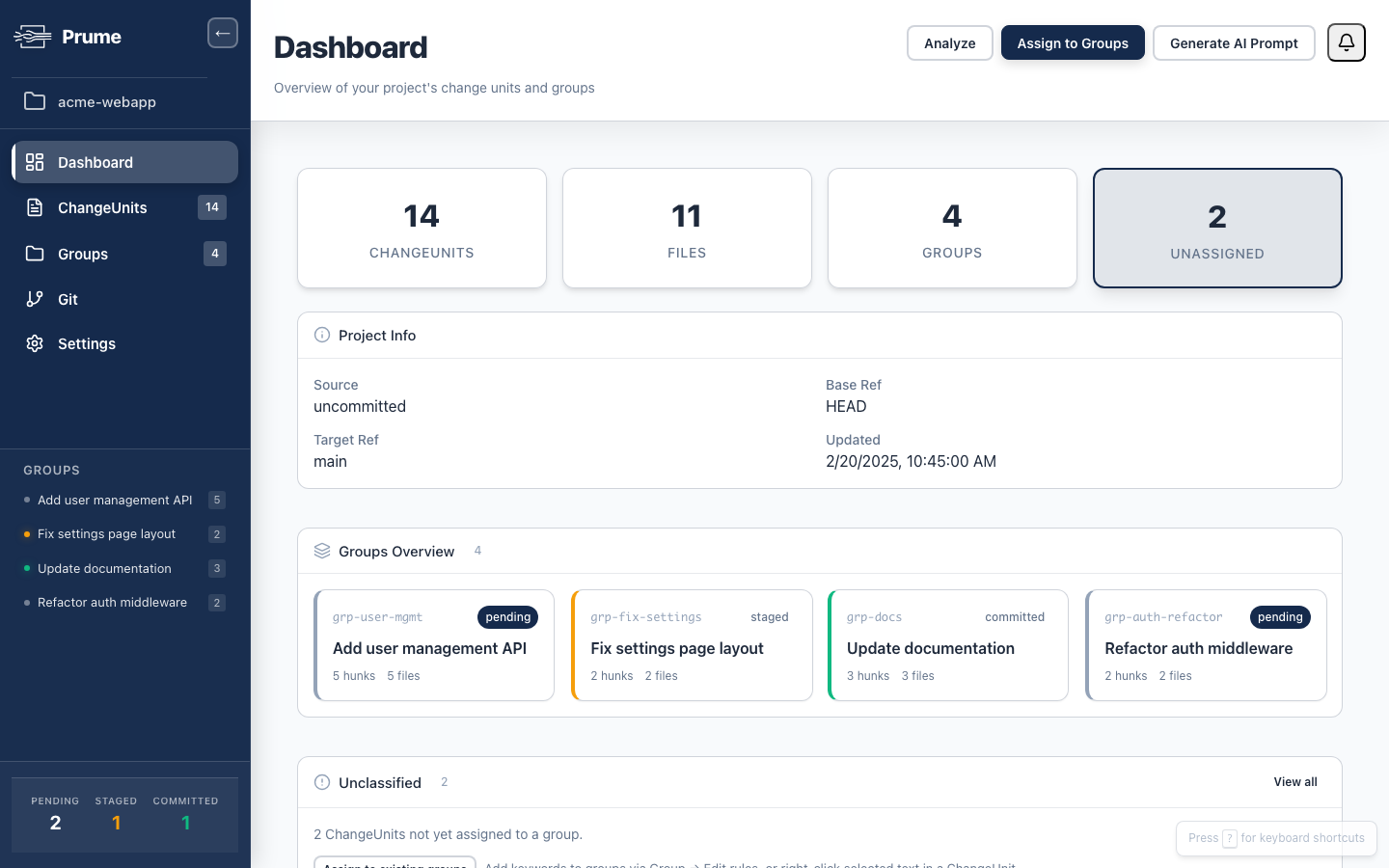
Scanned 47 files, extracted 14 change units
$ prume classify
12 change units classified by rules (layers 1–3)
2 change units classified by AI (layer 4)
→ 4 groups created
$ prume status
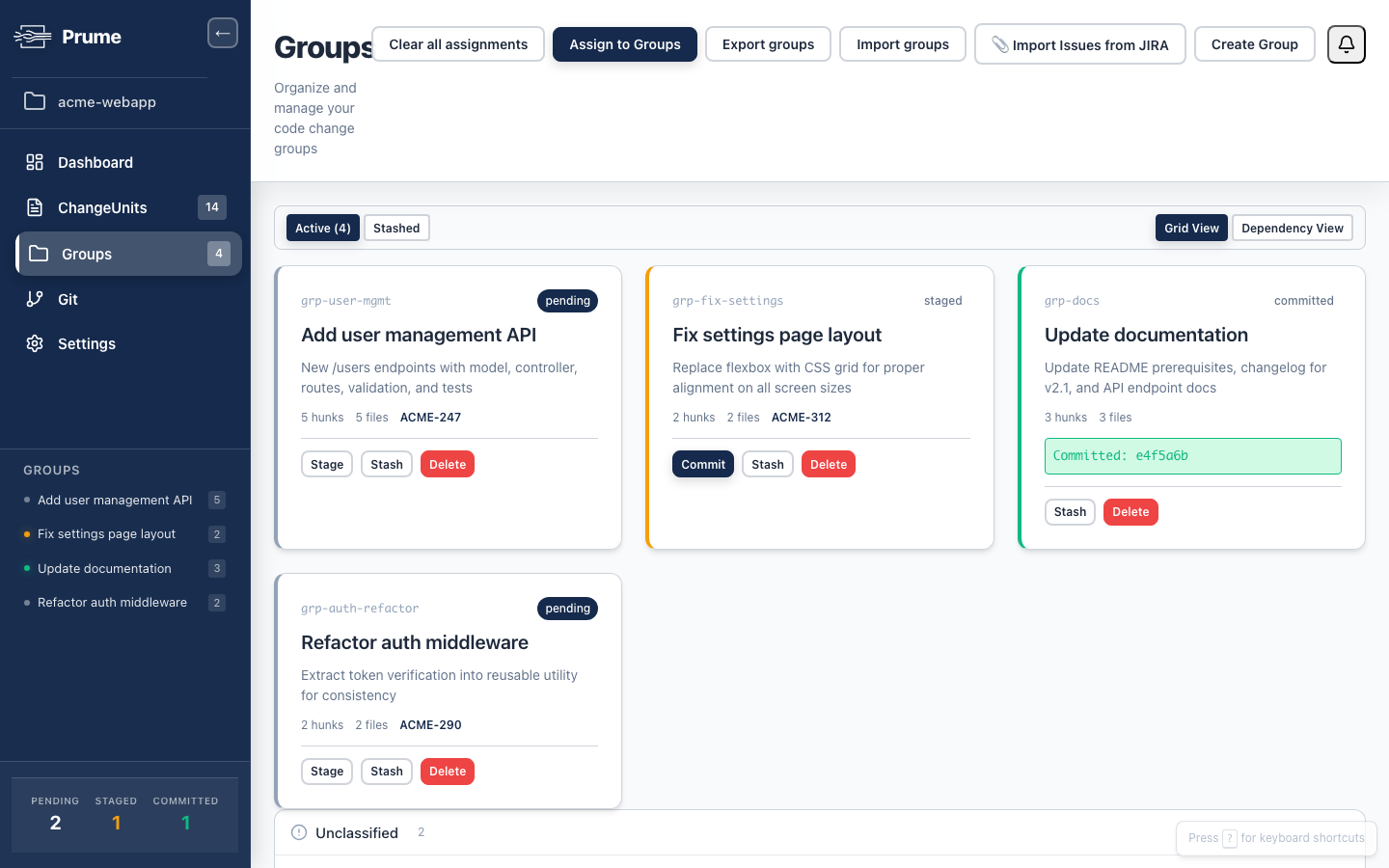
• Add user management API (ACME-247)
5 files · 5 hunks — pending
• Fix settings page layout (ACME-312)
2 files · 2 hunks — staged
• Update documentation
3 files · 3 hunks — committed
• Refactor auth middleware (ACME-290)
2 files · 2 hunks — pending
$ prume commit --all
✓ Created 4 focused commits
✓ Updated 3 Jira issues
Prefer a visual interface? Prume Pro adds a Web UI for drag-and-drop grouping.
Frequently asked questions
Everything you need to know about Prume.
What is Prume?+
Prume is a developer tool that organizes messy Git changes into clean, single-concern commits. It uses a 4-layer classification pipeline with predictable, deterministic rules and optional AI to split tangled working directories into focused, atomic commits.
Does Prume send my code to external servers?+
No. The free CLI runs entirely locally. Prume Pro's AI classification sends only diff content to the configured LLM provider, never full source files. Your source code never leaves your machine for any other purpose.
How is Prume different from interactive rebase?+
Interactive rebase (git rebase -i) requires you to manually split commits after they're created. Prume works before the commit — it classifies individual hunks into groups and creates clean commits from the start, with no history rewriting needed.
What languages and frameworks does Prume support?+
Prume is language-agnostic. It works at the Git diff level, so it supports any programming language, framework, or file format that Git can track.
Can I use Prume without the AI features?+
Yes. The free CLI uses only deterministic rules — file path matching and manual grouping. AI classification is a Pro feature and completely optional. Most changes are classified by rules alone.
How much does Prume cost?+
The Prume CLI is free forever and MIT-licensed. Prume Pro Individual costs $8/month or $79/year. Team plans start at $7/seat/month billed annually. Enterprise pricing is custom.
Does Prume work with my existing Git workflow?+
Yes. Prume operates on your working directory and staged changes and creates standard Git commits. It doesn't modify your branching strategy, CI/CD, or remote repositories.
How do stacked PRs work in Prume?+
Prume Pro can export commit groups as stacked pull requests. Each group becomes a separate PR with proper dependency ordering. Prume integrates with Graphite and GitHub's native stacked PR support.
Ready to bring order to the chaos?
Try the free CLI or get the full Prume Pro experience with a 14-day free trial.
Free forever. MIT licensed.
14-day free trial. No signup required.